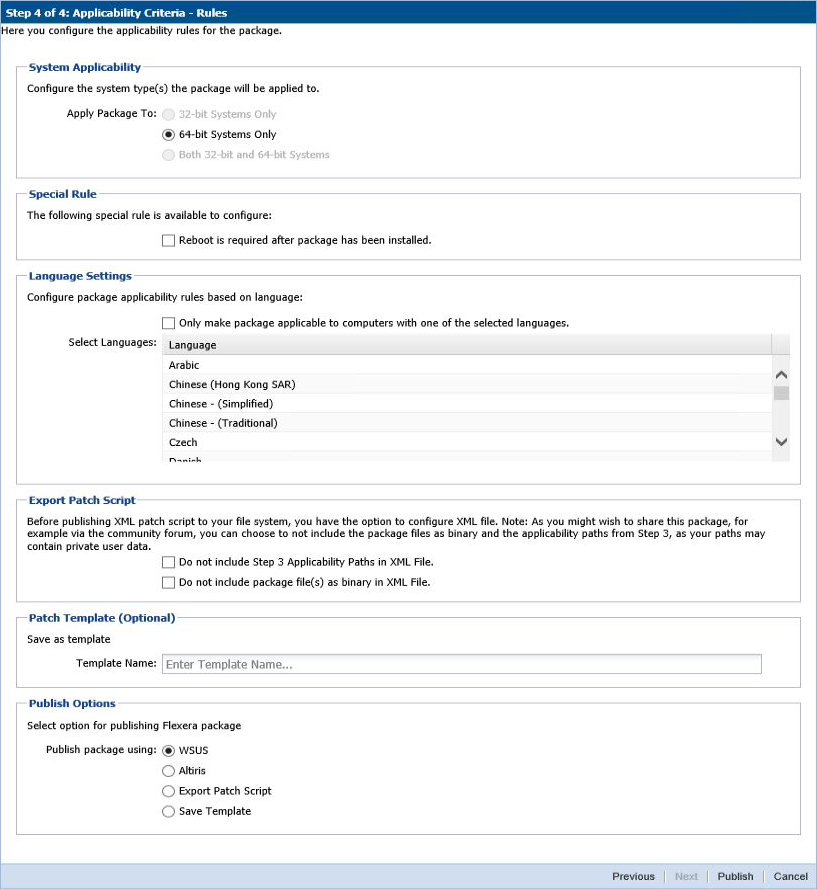
The WSUS option will be unavailable if the WSUS Connection is not established.
To export the package select File System (Export) and click Publish.
If a reboot is required after the package has been installed, this option can also be configured in the second part of this step, as well as checking if Java is running.
To configure your package to only be applicable for certain languages of the operating system, select Only make package applicable to computers with one of the selected languages and select the relevant language.
In this step you are also able to export the package that you have already configured to be used for future reference. You have the option to include or exclude Step 3 applicability paths and the installer as binary.
The two options (Do not include Step 3 Applicability Paths in XML File and Do not include the package file(s) as binary in XML File) are taken into consideration only when exporting the package to the File System (Export). Otherwise the selection will be disregarded.
Software Vulnerability Manager 2018 (Cloud Edition) Quick Start GuideNovember 2018 |
Copyright Information | Flexera Software |