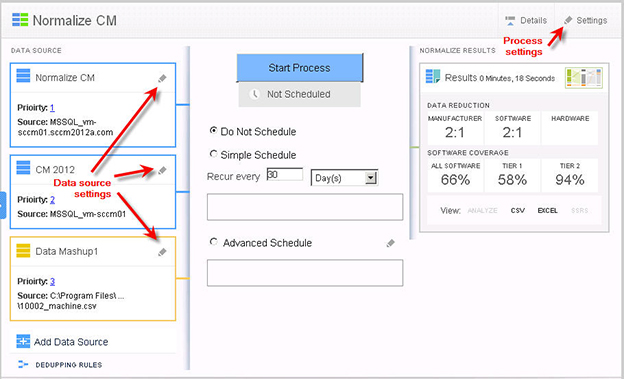
Accessing the Data Source and Process Settings Screens
Data Platform
You can access two types of settings from the main screen of the Administration Console.
|
•
|
Data Source Settings—Click the Edit icon located in the process’s Data Source pane. |
|
•
|
Data Platform Normalize Processes—View and edit the data source name, type, and location settings. |
|
•
|
Purchase Order Processes—View and edit the data source name, type, and configuration settings.. |
|
•
|
Data Mashup Processes—View and edit data source name, mashup source, and file settings. |
|
•
|
Process Settings—Click the Settings link located on the right-side of the process Overview pane. |
|
•
|
Data Platform Normalize and Normalize CM Processes —View and edit History, Metering, and Output Formats settings. |
|
•
|
Purchase Order Processes—View History and Output Format settings. |
Accessing Data Platform Normalize Data Source and Process Settings