Setting Metering Rules
Data Platform
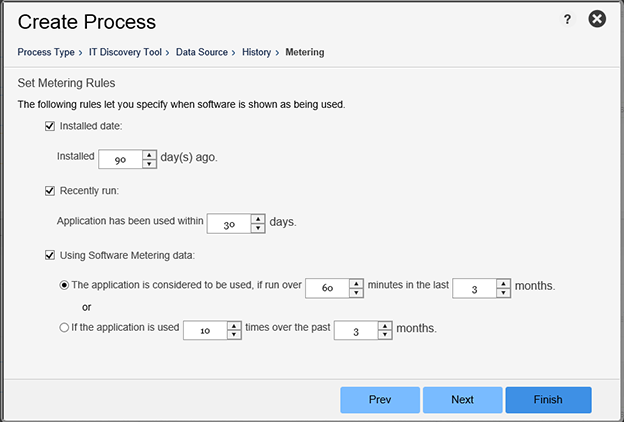
Use this screen to view and edit when software is shown as being used. Metering options are dependent on the IT Discovery Tool. If an IT Discovery tool does not provide metering information, the option will still be visible in the UI, but will not be available for use.
| • | Installed date—Place a check here if you want to calculate the usage based on the installed date. |
| • | Recently run—Place a check here if you want to calculate the usage based on the last run date. |
| • | Using software metering data—Place a check here to specify the rules that define what determines the “use” of software. Click either radio button to specify the following: |
| • | The application is considered to be used if run over a specified number of minutes in the last specified number of months. |
| • | The application is used a specified number of times in the last specified number of months. |
Note:Click Next to proceed to the Output Format settings screen.
Setting Metering Rules